
Download Zoho Books – Accounting Software, Free Trial, Secure Online Bookkeeping
Overview
Zoho Books is a cloud‑based accounting platform built specifically for small businesses and independent accountants who need a single, secure place to manage all financial transactions. Unlike fragmented spreadsheets or multiple legacy programs, Zoho Books brings invoicing, expense tracking, bank reconciliation, and tax compliance into one intuitive online portal. The onboarding experience is guided, meaning new users are walked through a short setup wizard that connects bank feeds, imports existing ledgers, and configures tax rates in minutes.
Once the initial configuration is complete, every transaction—whether a client payment, supplier bill, or payroll entry—is automatically synced to the central ledger, eliminating duplicate data entry and reducing the risk of errors. Zoho Books also supports role‑based access, allowing the primary accountant to invite up to two additional users with customized permissions, so team members can view reports, approve expenses, or manage client communications without exposing sensitive data. The platform is constantly updated by Zoho’s development team, ensuring compliance with the latest financial regulations and providing new automation tools without any manual patching.
With a 30‑day free trial, small businesses can evaluate the full suite of features before committing to a modest monthly subscription, making it a risk‑free way to modernize bookkeeping and free up valuable time for growth‑focused activities.
Key Features of Zoho Books
- Automated Invoicing & Payments: Create professional invoices, set recurring billing, and accept online payments through Stripe, PayPal, and ACH.
- Expense Management: Capture receipts on the go, categorize expenses, and match them automatically to bank transactions.
- Bank Reconciliation: Real‑time bank feed integration for automatic transaction matching and reconciliation.
- Multi‑Currency & Tax Support: Handle foreign currency invoices, apply regional tax rules, and generate GST/VAT reports.
- Project Billing & Time Tracking: Track billable hours, allocate costs to projects, and invoice clients based on logged time.
- Financial Reporting: Generate profit & loss statements, balance sheets, cash flow reports, and custom dashboards.
- Role‑Based Access: Add up to two collaborators with customized permissions for viewing or editing data.
- Client Portal: Secure portal where customers can view invoices, make payments, and download statements.
- Mobile Apps: Native iOS and Android apps let you manage finances from anywhere, even offline.
- Integrations: Connects seamlessly with Zoho CRM, Zoho Inventory, and popular third‑party tools like Slack and Zapier.
Each feature is designed to reduce manual effort and improve financial visibility. For instance, the automated invoice reminders reduce days sales outstanding, while the expense capture tool leverages OCR technology to extract data from photos, cutting the time spent on receipt entry by up to 70 percent. The platform also offers customizable workflow automations—such as auto‑approving low‑value expenses or triggering email alerts when a payment is overdue—so businesses can enforce internal controls without writing code. Because Zoho Books lives in the cloud, all data is backed up continuously, and users benefit from regular security patches that meet industry standards like ISO 27001 and GDPR. The comprehensive feature set positions Zoho Books as a true all‑in‑one solution for small enterprises seeking a reliable, scalable accounting tool.
Installation, Usage & Compatibility
Getting started with Zoho Books is straightforward. Begin by visiting the official Zoho Books website and clicking the “Start Free Trial” button. You will be prompted to create a Zoho account or log in with an existing one. After confirming your email, the setup wizard asks for basic business details—company name, fiscal year, and currency—followed by an optional import of existing data from CSV files or other accounting software. The next step connects your bank accounts via secure OAuth authentication; once linked, transactions flow into Zoho Books automatically.
The web application runs on any modern browser (Chrome, Firefox, Edge, Safari) and does not require any local installation. For users who prefer desktop access, Zoho provides a lightweight Electron‑based wrapper that can be downloaded for Windows and macOS, offering offline caching and automatic sync when an internet connection returns. Mobile users can install the native apps from the Apple App Store or Google Play Store. All versions share the same feature set, ensuring a consistent experience across devices.
Supported operating systems include Windows 10/11, macOS 10.15+ (Catalina and later), iOS 13+ for iPhone and iPad, and Android 8.0+ for smartphones and tablets.
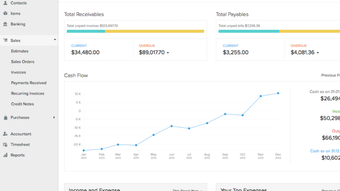
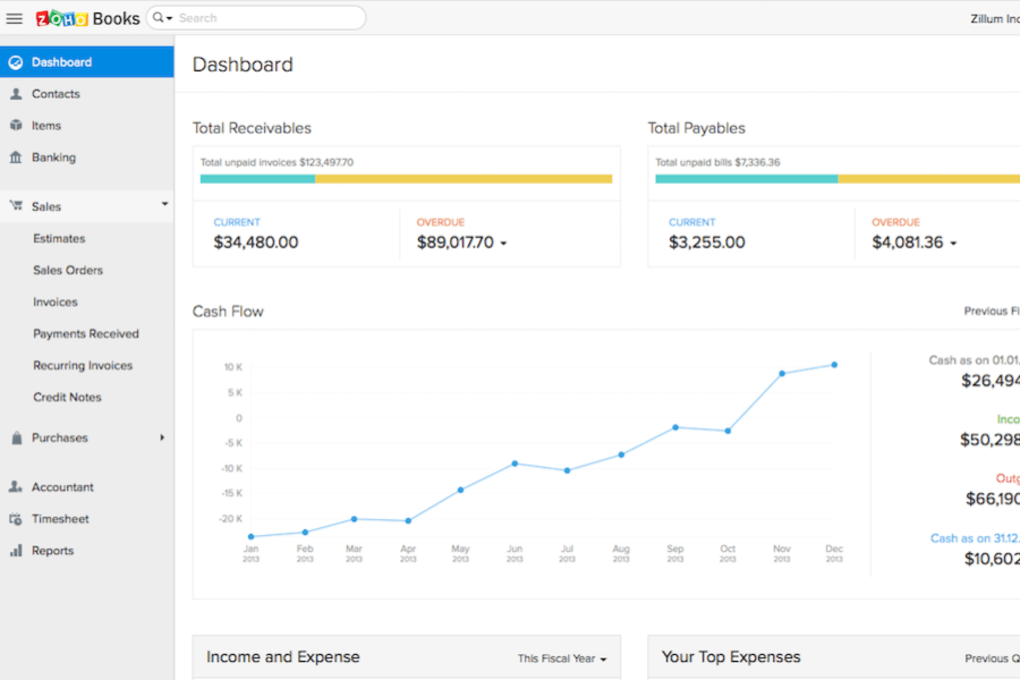
Daily usage revolves around a clean dashboard that displays key metrics such as unpaid invoices, cash balance, and upcoming expenses. Users can drill down into each module via the left‑hand navigation bar. The invoicing module lets you select a client, add line items, apply discounts, and preview the final PDF before sending.
The expense module provides a “Snap Receipt” button that opens the camera, captures the image, and instantly creates an expense entry with populated fields. For advanced reporting, the “Analytics” tab offers drag‑and‑drop widgets to build custom financial dashboards that can be exported as Excel or PDF files. Because everything is stored in the cloud, changes are saved instantly, and collaboration is seamless—any user with the appropriate role sees updates in real time.
Pros, Cons, Frequently Asked Questions & Conclusion
Pros
- All‑in‑one platform eliminates the need for multiple separate tools.
- Robust automation reduces manual data entry and saves time.
- Secure cloud storage with regular compliance‑focused updates.
- Comprehensive mobile apps for on‑the‑go accounting.
- Scalable pricing plans that grow with your business.
Cons
- No native marketplace for third‑party add‑ons, limiting extensibility.
- Advanced inventory management features are only available in higher‑tier plans.
- Learning curve for users transitioning from spreadsheet‑based bookkeeping.
Frequently Asked Questions
Is Zoho Books really free?
Zoho Books offers a 30‑day free trial with full access to all features. After the trial, you need to select a paid plan, but there is no permanently free tier.
Can I import data from QuickBooks?
Yes, Zoho Books provides a CSV import tool and a direct migration wizard for QuickBooks, Xero, and other popular accounting packages.
How secure is my financial data?
Data is encrypted at rest and in transit using TLS 1.2+. Zoho complies with ISO 27001, SOC 2, and GDPR, and offers two‑factor authentication for added protection.
Can I add more than two users?
The standard plan allows up to three users (owner + two collaborators). Higher‑tier plans increase the user limit, and you can purchase additional seats as needed.
Does Zoho Books integrate with my bank?
Zoho Books supports bank feeds for thousands of banks worldwide. If your bank isn’t listed, you can still import statements manually via CSV.
Conclusion & Call to Action
For small businesses seeking a reliable, secure, and feature‑rich accounting solution, Zoho Books delivers an impressive balance of automation, ease of use, and affordability. The 30‑day free trial lets you explore every module without commitment, while the cloud‑first architecture ensures you’re always working with the latest regulations and security patches. Although the lack of a third‑party app marketplace may be a drawback for highly customized workflows, the built‑in integrations with Zoho’s ecosystem and major payment gateways cover most everyday needs. If you’re ready to replace manual spreadsheets, streamline invoicing, and gain real‑time insight into your cash flow, download Zoho Books today and start your free trial—your finances will thank you.
Zoho Books transformed the way our boutique agency manages finances. The automated invoice reminders cut our DSO by 20 %, and the mobile receipt capture saves us hours each week. The learning curve was minimal thanks to the guided setup, and the support team was quick to answer our questions. Highly recommended for any small business looking to professionalize its bookkeeping.



.png)



